
Watching a parent grow older is one of life’s most tender – and stressful – experiences.
If your mom or dad lives alone, chances are you’ve lain awake wondering: Are they okay right now? Would I know if something went wrong?
You’re not alone.
According to the U.S. Census Bureau’s 2023 Current Population Survey, about 28% of Americans aged 65 and older (roughly 16 million people) live by themselves.
The good news: today’s options for monitoring an elderly parent living alone are more varied, effective, and dignity-preserving than ever before.
This guide covers everything you need to know, from low-tech check-in strategies to professional in-home monitoring services, so you can build a safety net that actually works for your family.
Why Monitoring Matters (And What You’re Really Watching For)
Before diving into solutions, it helps to understand the specific risks that make living alone more dangerous for older adults:
- Falls — The CDC reports that one in four adults over 65 falls each year, and falling once doubles the chance of falling again. Falls are the leading cause of injury-related death in older adults.
- Medical emergencies — Heart attacks, strokes, and diabetic episodes can strike without warning. Minutes matter.
- Cognitive decline — Early dementia or Alzheimer’s can cause a parent to wander, leave the stove on, miss medications, or become vulnerable to scams.
- Social isolation — Loneliness is linked to a 26% increased risk of premature death, comparable to smoking 15 cigarettes a day.
- Medication mismanagement — Skipping doses or double-dosing is common and can have serious consequences.
Monitoring isn’t about control or surveillance. It’s about making sure help reaches your parent fast when it’s needed (while letting them live on their own terms).
Start with a Conversation, Not a Camera
Before installing any technology or hiring any service, talk to your parent. This step is non-negotiable.
Many adult children make the mistake of setting up monitoring tools without fully including their parent in the decision.
This breeds resentment, erodes trust, and can backfire – parents may disable devices they feel were forced on them.
Questions to ask together:
- “What are you most worried about living alone?”
- “Would you feel safer if we had a way to check in without you having to call me every time?”
- “What would feel like too much — like we’re watching you too closely?”
- “If something happened and you couldn’t reach the phone, what would you want to happen?”
Their answers will guide every decision that follows.
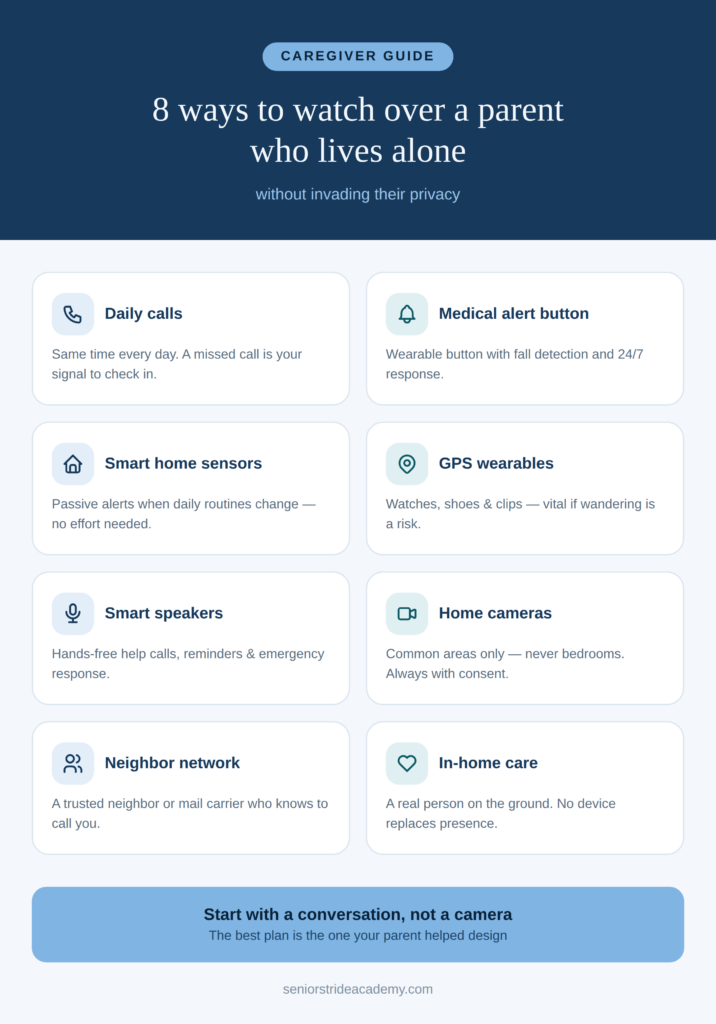
8 Ways to Monitor an Elderly Parent Living Alone
1. Scheduled Phone or Video Calls
The simplest monitoring tool is also the most meaningful: a regular call.
Set a consistent daily or twice-daily time to connect – mornings and evenings work well. Miss the call, and you have a clear signal to investigate.
Video calls (FaceTime, WhatsApp, Google Duo) add an important visual layer. A bad fall, confusion, or slurred speech is much easier to spot on video than over the phone.
Tips for success:
- Make it a habit, not a chore. Frame it as “our morning coffee together.”
- Use a tablet if your parent struggles with smartphones.
- Enlist siblings or other family members to rotate check-in duties.
2. Personal Emergency Response Systems (PERS)
Also called medical alert systems, these devices let your parent press a button to summon help 24/7.
They’ve come a long way from the “I’ve fallen and I can’t get up” commercials of the 1980s.
Modern options include:
- In-home devices with a base station and wearable button (necklace or wristband)
- Mobile GPS devices that work outside the home
- Smartwatches with built-in fall detection and emergency calling
What to look for: Two-way voice communication, fall detection (automatic), GPS tracking, waterproof design (for shower use), and 24/7 monitoring center access.
Popular brands include Life Alert, Medical Guardian, and Bay Alarm Medical.
3. Smart Home Sensors and Monitoring Systems
Passive monitoring — where sensors track activity without your parent having to do anything — is one of the most powerful tools available for long-distance caregivers.
These systems use motion sensors, door/window sensors, and activity detectors placed around the home.
If the pattern changes (the refrigerator hasn’t been opened by 10 a.m., or Mom hasn’t moved around the house by her usual time), you get an alert.
What smart home monitoring can track:
- Daily activity patterns (movement, routine behaviors)
- Whether a door was opened (bathroom, bedroom, front door)
- Temperature inside the home
- Appliance use (stove, coffee maker)
- Sleep patterns (with bed sensors)
Envoy at Home is a popular smart home sensing system that uses sophisticated software and small motion sensors to create a real-time picture of your parent’s movement throughout the home.
4. GPS Trackers and Wearables
If your parent has early-stage dementia, Alzheimer’s, or a tendency to wander, a discreet GPS tracker can be a lifesaver — sometimes literally.
Wearable GPS options include:
- GPS shoes or shoe inserts
- Smartwatches with location tracking
- Discreet clip-on trackers for clothing or bags
The AngelSense is designed specifically for seniors with cognitive decline (and special needs children).
5. Smart Speakers with Check-In Features
Amazon Echo and Google Home devices do more than play music.
With the right setup, they become surprisingly capable safety tools – and because many older adults already have one in the home, the barrier to getting started is low.
Free built-in features (no subscription required):
- Your parent can say “Alexa, call [your name]” from anywhere in the house — no phone needed
- Drop-in calling lets family members audio check in without your parent needing to answer or touch anything
- Alexa can set and announce medication reminders, appointment alerts, and daily routines on command
Alexa Emergency Assist – the subscription upgrade worth knowing about:
For families who want a more robust safety net, Amazon offers Alexa Emergency Assist (at $5.99/month or $59/year for Prime members; $7.99/month or $79/year for non-Prime).
It turns any Echo device into a hands-free emergency response system with a meaningful set of features:
24/7 Urgent Response. When your parent says “Alexa, call for help,” they’re connected immediately to a live, trained agent — not a recording, not 911 directly. The agent assesses the situation, can dispatch fire, police, or ambulance to your parent’s address, and simultaneously notifies you. This is the same basic concept as a medical alert system, delivered through a device your parent may already be comfortable using.
Pre-saved first responder information. Before an emergency happens, you can store critical information in the Alexa app — your parent’s address, medical conditions, allergies, medications, gate codes, and even whether there are pets in the home. When Urgent Response contacts first responders, this information is passed along automatically. The agent can also pinpoint which room in the house the call came from, based on which Echo device was used.
Up to 25 emergency contacts. When an Urgent Response call is initiated, Alexa automatically notifies everyone on your emergency contact list via smartphone notification and SMS — so the whole family knows immediately, not just whoever happens to pick up the phone first.
Smoke and carbon monoxide alarm detection. All Echo devices enrolled in Emergency Assist continuously listen for the acoustic signature of smoke or CO alarms. If one sounds — even while your parent is asleep or in another room — Alexa announces on every device in the home to leave immediately and call for help. You receive a phone alert with a sound snippet of the alarm so you can confirm it remotely, plus a one-tap option to connect with Urgent Response. This effectively turns your parent’s existing smoke detectors into a connected alert system.
Glass break detection. Emergency Assist also listens for the sound of breaking glass, which can signal a fall involving glass, a break-in, or another dangerous situation, and triggers the same alert flow.
Drop-in remote monitoring. If an alarm is detected and you receive an alert, you can use Drop In to listen live through the Echo device that triggered the alert — helping you assess the situation from wherever you are before emergency services arrive.
One important limitation to know: Alexa Emergency Assist requires an internet connection and does not function during a power or internet outage. For parents in areas prone to outages, pairing it with a cellular-based medical alert device as a backup is a smart move.
Compatible devices: Emergency Assist works with all generations of Echo, Echo Dot, Echo Plus, Echo Studio, Echo Spot, and Echo Show. It does not work with Echo Auto or Echo Buds.
For parents who are comfortable with technology, a smart speaker with Emergency Assist is one of the most seamless and affordable monitoring upgrades available — integrating emergency response, family alerts, and home safety detection into a device that already lives on the kitchen counter.
Amazon Echo and Google Home devices do more than play music. With the right setup, they become daily check-in tools:
- Amazon’s Alexa Emergency Assist allows family members to remotely check in, set activity alerts, and receive urgent help requests
- Your parent can say “Alexa, call [your name]” from anywhere in the house
- Drop-in calling lets you audio check in without your parent needing to answer
For parents who are comfortable with technology, a smart speaker is low-friction, non-intrusive, and doubles as entertainment and companionship.
6. Home Security Cameras
Video cameras offer real-time visual peace of mind.
Many families use indoor cameras in common living areas (living room, kitchen) or a front door camera to confirm comings and goings.
Important ground rules:
- Never install cameras in bathrooms or bedrooms — this is a privacy violation and deeply damaging to trust
- Always tell your parent where cameras are and what they see
- Get your parent’s consent, in writing if possible
- Clarify who can access the footage and when
Highly rated options include the Wyze Cam, Arlo, and Nest Cam. Many offer two-way audio so you can speak to your parent through the device.
7. Neighbor and Community Networks
Don’t underestimate the power of human connection.
Enlist a trusted neighbor, mail carrier, or church friend to keep an informal eye out. Ask them to call you if newspapers pile up, lights don’t change in the evening, or your parent seems “off.”
Apps like Nextdoor can also help you quietly connect with neighbors near your parent’s home who may be willing to check in occasionally.
8. Professional In-Home Companion and Care Services
Sometimes, the most comprehensive monitoring solution is a trusted person on the ground.
Professional in-home care provides regular human presence, safety oversight, and the kind of companionship that no device can replicate.
How to Introduce Monitoring Without Conflict
Even after a good initial conversation, resistance is normal.
Here are strategies that can help:
Frame it as mutual peace of mind. “I’d worry so much less if we had this” is more effective than “You need this for your safety.”
Start small. A medical alert button feels less invasive than cameras. Earning trust with a small step makes larger steps easier later.
Give them control. Let your parent choose which device they prefer, where cameras are placed, or which caregiver service they feel comfortable with. Autonomy matters enormously to older adults.
Revisit regularly. A 75-year-old who’s fully independent may need only a weekly call and a fall detector. The same person at 82 with early cognitive decline may need daily companion visits. Reassess every six to twelve months.
Red Flags That Mean It’s Time to Act
If you’re on the fence about whether monitoring is necessary, watch for these warning signs during visits or calls:
- Unexplained bruises (possible falls not reported)
- Unwashed dishes, unopened mail, or cluttered spaces (change from normal habits)
- Expired or missing medications (management issues)
- Confusion about dates, recent events, or familiar people
- Weight loss or signs of not eating regularly
- Withdrawal from activities or friends they previously enjoyed
- Unpaid bills or suspicious financial activity (vulnerability to scams)
- Reluctance to discuss how things are going (hiding problems)
Any of these signals warrants a more proactive monitoring plan and possibly a conversation with their physician.
For more info, check out our full guide on signs that a parent may need more supervision.
Final Thoughts
Monitoring an elderly parent who lives alone is an act of love – but it works best when it’s built on respect, communication, and genuine partnership with your parent.
The right combination of technology, professional services, and human connection can give your parent the safety net they need while honoring the independence that matters so much to them.
Keep in mind though, that there’s no one-size-fits-all answer.
But with the options available today, there’s almost certainly an answer that fits your family.
If nothing else, I encourage you to start the conversation.
Build the plan one layer at a time and remember: the goal isn’t to eliminate risk (that’s impossible).
It’s really to make sure your parent can live as fully as possible, with help arriving quickly when it’s truly needed.
Frequently Asked Questions
Is it legal to monitor an elderly parent without their knowledge? In most U.S. states, installing cameras in a private home without the resident’s knowledge is a legal gray area at best and potentially illegal at worst — and ethically problematic regardless. Always involve your parent in monitoring decisions.
How do I monitor a parent with dementia who resists help? This is one of the hardest caregiving challenges. A geriatric care manager can help mediate, and in some cases a physician’s recommendation can shift the conversation. GPS trackers that don’t require active use are often less resisted than devices that feel intrusive.
What’s the best monitoring option for a tight budget? Daily phone check-ins, a neighbor network, and a basic medical alert button (available for as little as $20–30/month) provide solid baseline coverage without high cost.
How do I get siblings on the same page about monitoring? A family meeting — in person or via video call — with a shared agenda helps. Assign roles clearly: who does daily check-ins, who manages medical appointments, who reviews caregiver reports. Written agreements reduce conflict.
At what point should an elderly parent stop living alone? When safety risks consistently outweigh the benefits of independence — repeated falls, significant cognitive decline, inability to manage medications, or extreme isolation — it may be time to consider assisted living or a move closer to family. This is a deeply personal decision best made with input from the parent, family, and the parent’s physician.